Title: SAP S/4HANA Embedded Analytics – The Comprehensive Guide

Are you an SAP professional looking to fully leverage the embedded analytics capabilities in SAP S/4HANA? SAP S/4HANA Embedded Analytics: The Comprehensive Guide by Anurag Barua, Peter Wesselmann, and Sudipta Malakar is your go-to resource for transforming raw transactional data into actionable insights, right from within the system. This blog dives into the book, providing an engaging overview of how SAP S/4HANA Embedded Analytics can be practically implemented to drive efficiency and improve decision-making in your organization.
What is Embedded Analytics in SAP S/4HANA?
SAP S/4HANA Embedded Analytics allows for real-time, integrated analytics within the core S/4HANA environment, enabling users to analyze transactional data instantly without the need for data replication.

Unlike traditional reporting tools, embedded analytics empowers users with seamless insights derived directly from live operational data, significantly reducing data latency.
According to the authors, “Embedded analytics bridges the gap between transactional and analytical systems, bringing the power of real-time analytics to the fingertips of business users.” It enables operational reporting, key performance indicator (KPI) monitoring, and even predictive analysis, all integrated into SAP’s modern Fiori interface.
For a detailed breakdown, refer to SAP Help documentation on Embedded Analytics in SAP S/4HANA.
Understanding the Analytics Landscape in SAP S/4HANA
The book effectively explains the architecture and tools that constitute the embedded analytics landscape. Here are some critical components:
- Core Data Services (CDS) Views
CDS Views are fundamental to SAP S/4HANA analytics, providing a layer that enables easy data modeling and querying. The book explains the power of CDS Views in building reusable models that support a variety of use cases—from operational reporting to advanced analytics.
“CDS Views act as the data model foundation for SAP S/4HANA, allowing businesses to build sophisticated analytical applications without redundant data storage.”
Examples of Standard CDS Views:
- I_OverdueAccountsReceivables: Provides with an overview of the overdue receivables for the accounts receivables in an aging grid. The search result aggregates the amount per net due interval of the aging grid and account (company code and customer).
- I_INSPLOTUSAGEDECISION: Provides access to the inspection lot usage decision data.
- P_PurchaseOrderItem: Shows detailed purchase order item data, which can be used by procurement teams to track orders and analyze purchasing trends.
Best Practices for CDS Views:
- Ensure proper use of annotations to define view properties, such as @Analytics.query: true to make a CDS view accessible for reporting.
- Use naming conventions to keep CDS views consistent and recognizable for ease of reuse.
For a deep dive, check the SAP Help documentation on Core Data Services.
- Fiori-Based Smart Business Cockpits
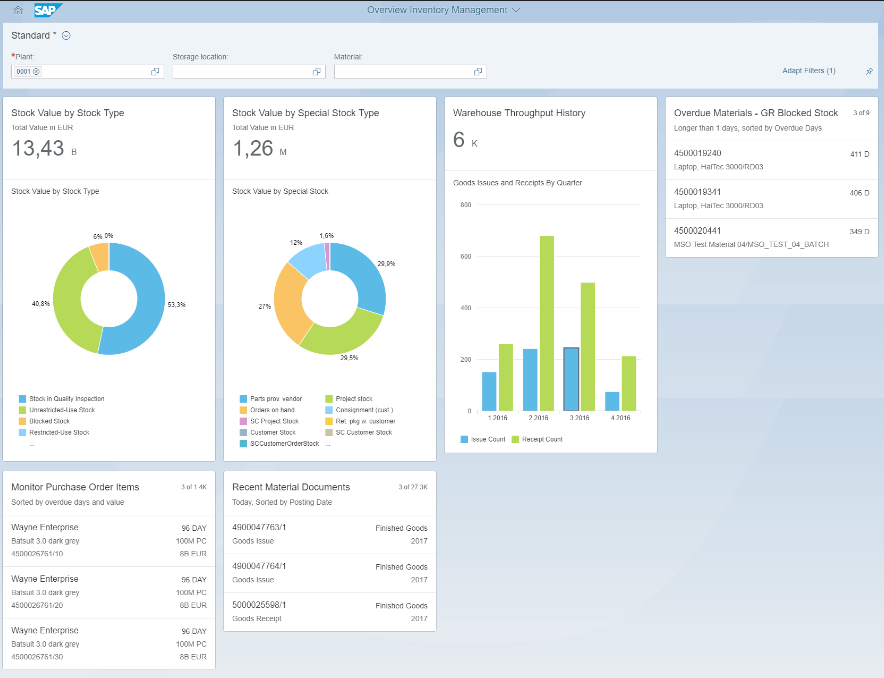
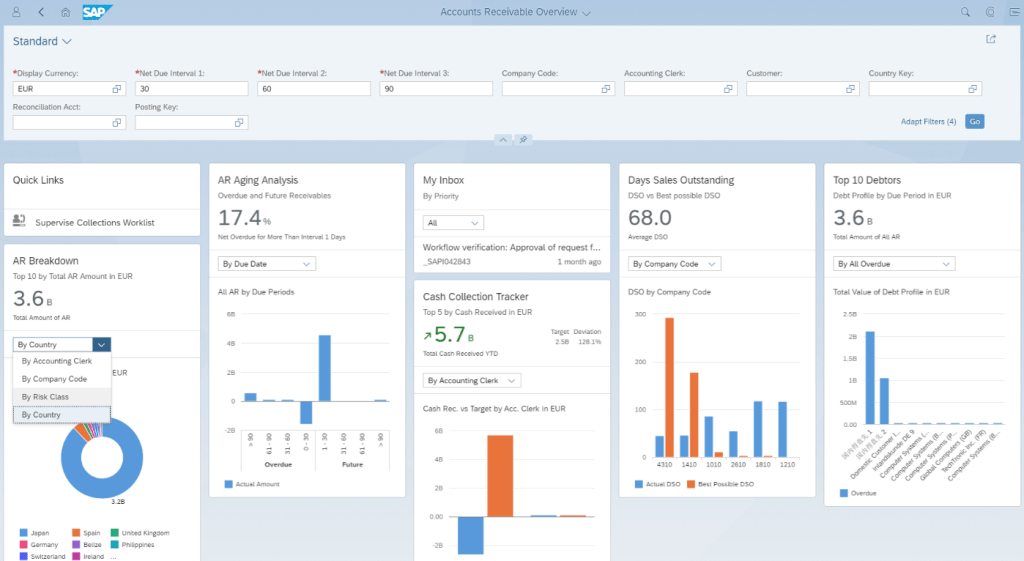
Fiori provides an intuitive, role-based user interface for embedded analytics. Smart Business Cockpits enable organizations to create KPI dashboards and drill-down reports, allowing users to react quickly to real-time operational data.
“The Smart Business Cockpit integrates KPIs and contextual navigation, empowering users with intuitive analytics experiences directly within their operational tasks.”
Examples of Smart Business Cockpits:
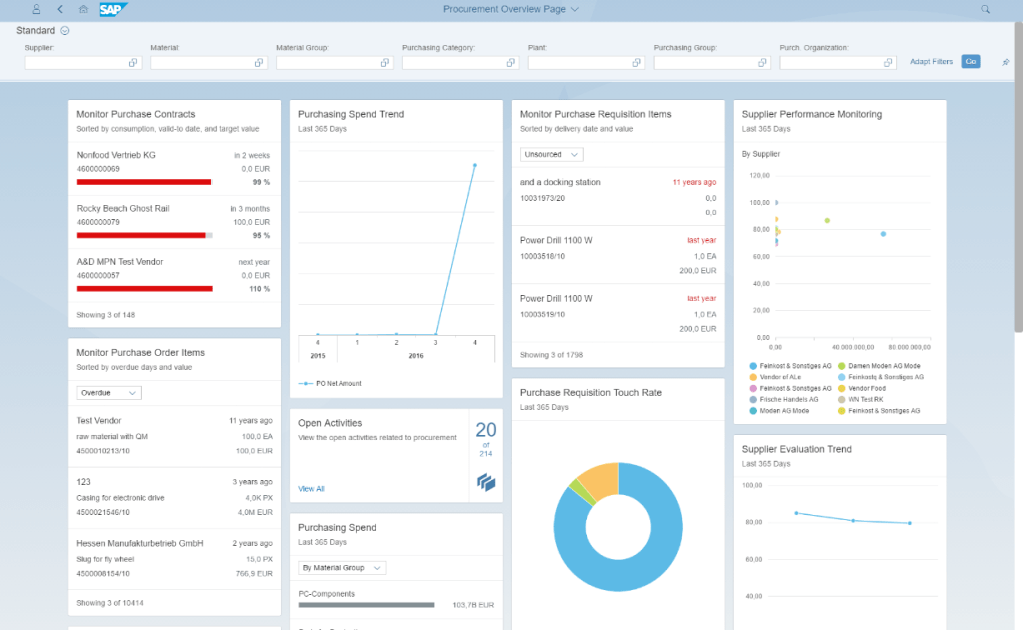
Procurement Overview: Provides procurement specialists with an overview of procurement KPIs such as purchase order value, supplier delivery performance, and procurement efficiency metrics.
- Inventory Management Overview: Enables inventory managers to track key metrics like stock levels, slow-moving items, and stock turnover rates, facilitating efficient inventory management.
- Accounts Receivable Overview: Allows finance users to monitor outstanding receivables, overdue invoices, and customer payment behavior, providing real-time visibility into cash flow.
Best Practice:
- Leverage SAP Smart Business KPIs to create real-time visibility into core business metrics and incorporate alerts for threshold breaches to ensure proactive management.
Explore SAP Smart Business Cockpits.
- Examples of Embedded Analytics Applications
SAP S/4HANA comes with several pre-built embedded analytics apps that provide instant value to business users. Here are some examples:
- Accounts Payable Overview: This app allows finance users to monitor payable accounts, overdue invoices, and supplier payment behavior in real-time. It provides key insights into cash flow and helps identify bottlenecks in payments.
- Stock – Multiple Materials: This app provides warehouse managers and inventory specialists with a snapshot of inventory levels for multiple materials. It helps ensure that stock levels are balanced, and potential shortages are addressed proactively.
- Sales Order Fulfillment Issues: This app is designed to help sales managers track sales orders and identify any issues that could impact fulfillment, such as credit blocks or delivery delays.
- Material Price Variance: This app enables procurement teams to analyze material price trends, compare suppliers, and evaluate historical purchasing data for better negotiations.
Each of these apps is built with CDS views as the data foundation, combined with Fiori elements for user-friendly interfaces, and can be extended or customized to meet specific business requirements.
- Creating Custom Analytical Applications
The book provides a clear pathway for creating custom analytical applications using ABAP tools and Fiori. It covers how to create customized apps to suit specific business needs when out-of-the-box solutions are not sufficient.
“Custom apps can fill the gap between standard reporting and the unique demands of your organization, allowing for precise insights tailored to your operational requirements.”
Best Practices:
- Start by analyzing available standard Fiori apps and extending them as needed before building custom solutions from scratch.
- Use ABAP Development Tools to enhance your CDS views and streamline development processes.
Check out ABAP Development Tools.
- Query Browser and Analytical Tools
SAP Query Browser and Analytical List Pages (ALP) are essential tools for ad-hoc analytics. The Query Browser allows you to explore predefined views, while ALPs combine both analytical and transactional capabilities.
“The Query Browser provides easy access to CDS views, enabling business users to extract and analyze data on-demand without technical know-how.”
Best Practice:
- Use the Analytical List Page to combine views of key metrics with actionable items, ensuring a closed-loop process between analysis and execution.
More on SAP Query Browser.
- Integration with SAP Analytics Cloud (SAC)
SAP Analytics Cloud can be seamlessly integrated with SAP S/4HANA to enhance visualization, forecasting, and predictive analysis. The book explores the integration paths to combine the strengths of SAC with the operational data in S/4HANA.
“Integrating S/4HANA Embedded Analytics with SAP Analytics Cloud enables a unified analytics strategy combining operational insights with advanced forecasting capabilities.”
Best Practice:
- Use Live Data Connection between S/4HANA and SAC to minimize latency and work with up-to-date information directly from the transactional system.
Refer to Integration with SAP Analytics Cloud.
Real-Time Business Benefits
The book uses real-world examples to illustrate the benefits of SAP S/4HANA Embedded Analytics:
- Finance: “CDS views can provide real-time financial visibility, enabling CFOs to close books faster by having accurate data at their fingertips.”
- Sales & Logistics: “Embedded Analytics can dynamically optimize supply chain processes by highlighting bottlenecks as they arise.”
Common Challenges and Best Practices
Challenges:
- Data Volume and Performance: High data volume can impact performance. Utilize filter conditions (@Consumption.filter) to minimize dataset sizes and improve query speeds.
- Complex Modeling Requirements: Creating custom CDS views may require combining multiple data sources and layers.
Best Practices:
- Always test CDS views for performance, especially when used in Smart Business KPIs.
- Document data lineage to understand the dependencies between different data models, helping maintain consistency.
What Sets This Book Apart?
The comprehensive approach taken by the authors, which mixes detailed technical configurations with practical use cases, makes this book a valuable resource for SAP professionals at all levels. The inclusion of diagrams, code snippets, and step-by-step guides enhances understanding and provides a hands-on approach to mastering embedded analytics.
How Will This Book Benefit You?
Whether you’re a developer, business user, or project manager, this book provides you with the tools to:
- Develop custom CDS views to meet specific reporting requirements.
- Enhance decision-making by integrating analytics directly into business processes.
- Improve overall system efficiency by leveraging real-time analytics instead of relying on manual data extracts.
Final Thoughts
SAP S/4HANA Embedded Analytics: The Comprehensive Guide offers a complete understanding of how to use SAP S/4HANA’s embedded capabilities to derive value from your data. It’s packed with real-world examples, best practices, and technical guides that allow you to build the skills needed to implement analytics that truly impacts business outcomes.
The authors provide a detailed yet engaging resource for any SAP professional looking to take their analytics capabilities to the next level.
Ready to unlock the power of embedded analytics in SAP S/4HANA? Grab a copy of the book, and start transforming your organization’s data-driven culture today. Let us know how you’re leveraging analytics in your business in the comments below, or feel free to ask any questions about implementing these solutions in your SAP environment.

 The Book Lovers
Leave a reply to Poppy Cancel reply